
For headhunters and search consultants
Open doors for the candidates who trust you, and both see the work.
When a candidate asks you to get them into the companies they want, they can add you to their search on Vector and share the list. You work it in a workspace of your own: the companies and roles they shared, a record of every approach that they can read, their notes when they choose to share them, and referrals they can accept. You stop reconstructing the last two weeks over email.
Every recruiter is reviewed before they can see candidates.
How working together goes
A relationship first. Then a shared list, and the work on it.
Most of the best introductions start with a candidate who already knows a headhunter. Vector gives the two of you one place to work.
Step 1
They add you
A candidate who knows and trusts you adds you to their search on Vector. You get a workspace of your own on it.
Step 2
You agree to work their targets
Their search appears on your list of candidates. You see only what they choose to share with you, and nothing else.
Step 3
They share the list
The companies they want opened, by name, and the roles they’re pursuing, one at a time. A role at a company on the list is shared with you too.
Step 4
The work begins
You log each approach, update and suggestion against the role. They read it on their own page for that role, the moment you log it.
Step 5
Notes, both ways
Your updates reach them, and they can share their own notes on a role with you. You read their notes; you can’t change them.
Step 6
You refer roles
Found something that fits? Refer it. It reaches their inbox with your name on it and enters their search only if they accept.
Why a candidate lets you in
Narrow access, enforced by the server.
A candidate is being asked to let an outside party see a live job search. They agree because the limits are real: the API decides what you can see and never sends a field you are not entitled to, rather than the page hiding it after the fact.
- You see a candidate’s search only while they have you working it
- Within that, only the companies and roles they explicitly shared
- Within those, only the fields they allow — the server never sends the rest
- Their own notes on a role only if they chose to share them, and read-only
- You log activity and suggestions; you never change their scores, stages or profile
- They can stop sharing a role, or end working together, at any time
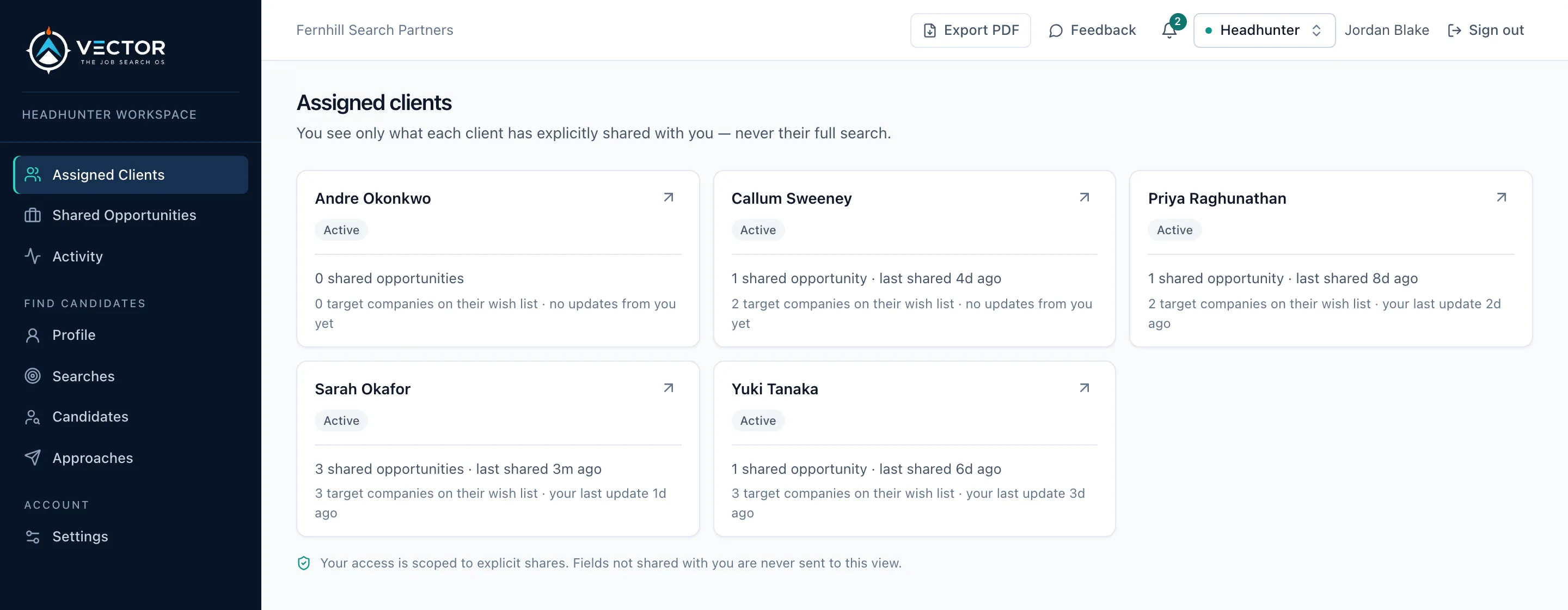
Every candidate who engaged you, in one place.
What each candidate shared with you, the companies they want opened, and when you last updated them. Nothing they haven’t shared ever reaches this screen.
What you get
A workspace per candidate, scoped to what they shared.
The companies they want opened
Their target list, by name: the accounts this candidate wants you working. A named list, not a guess about which of your relationships is relevant.
The roles they chose to share
A candidate shares specific opportunities with you, one at a time. You see those and nothing else — not their other pursuits, not the roles they passed on, not the companies they are quietly working themselves.
A sell brief for the ones you're pitching
For a shared role, the case for this candidate against this opportunity, drawn from their approved record — so the note you send a hiring manager starts from evidence rather than a blank page.
Log what you did
Record approaches, structured updates and suggestions against a shared role. The candidate sees your work in the same place as everything else in their search, so your contribution is visible rather than assumed.
Their notes, when they share them
A candidate can share their own notes on a role with you: who they spoke to, what they heard. You read them on the role, and they can stop sharing whenever they like.
Refer a role to them, properly
Put a role in front of a candidate as a referral. They accept or decline, and both of you can see which. A pitch with a state, instead of an email that may or may not have been read.
Several candidates, one workspace
Everyone who has engaged you, with what has been shared and what is outstanding on each — rather than a folder per person and a memory for the rest.
See it work
Watch a candidate add her headhunter, share her list, and the two of them work it, in about 30 seconds.
Sarah adds Jordan, he agrees, she shares the companies she wants opened, he logs an approach she can read, she shares her notes, and a referral arrives. Both sides, on the real product with demo data; nothing you do leaves this page.
Recruiters on Vector
Meet candidates who don’t know you yet.
The other way in: candidates who asked to be found by recruiters, in your specialties. Once one accepts your approach, you work their search together exactly as above.
Step 1
Apply
Tell us who you are, your firm and the searches you run. It takes a few minutes and it’s free.
Step 2
We review you
Every recruiter is checked by a person before they can see anyone. We email you when there’s a decision.
Step 3
Meet candidates who want to be found
Post the searches you’re running. See candidates who chose to be found by recruiters, without their names, and send a role to consider or a request to connect.
Step 4
They decide
A candidate can accept, decline or report an approach. Accept, and they’re named to you alone, and the two of you work their search together, the same way.
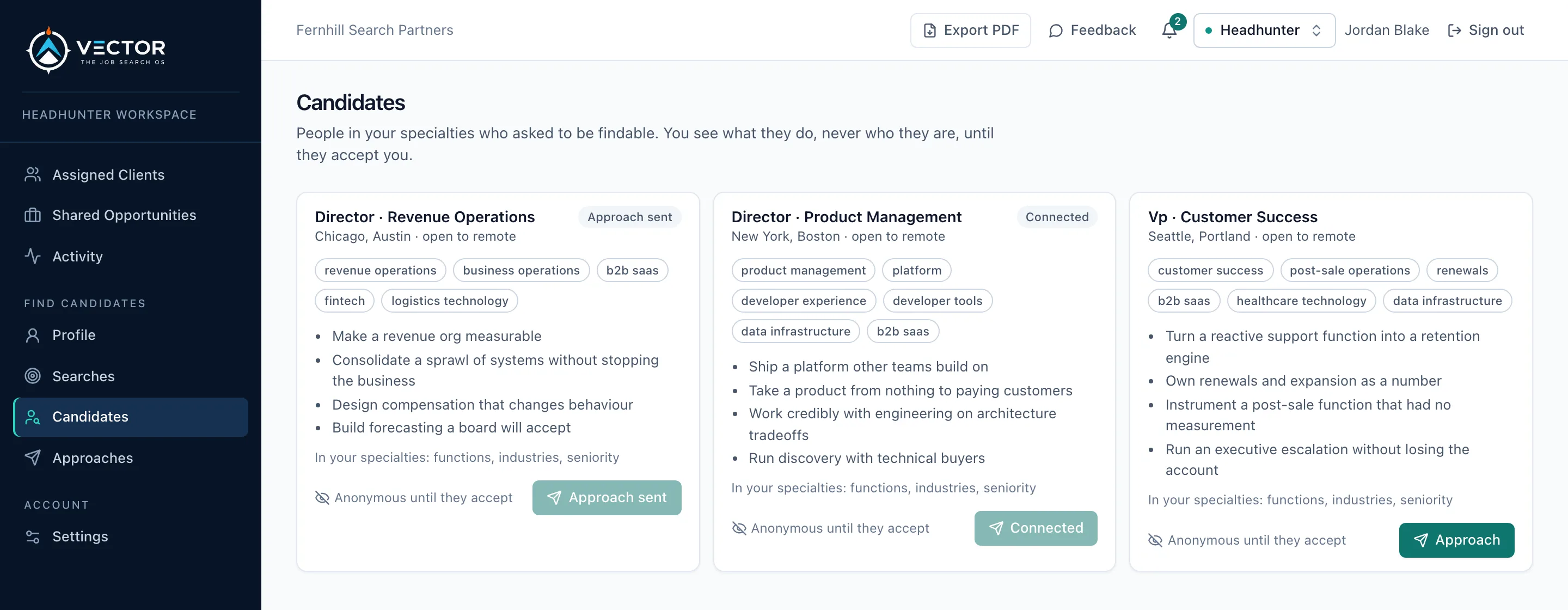
Candidates who asked to be found, without their names.
What each person does and has done, in your specialties. You learn who they are only when they accept your approach.
Your work, visible to the person who engaged you.
Their list of companies, the roles they share, a record of what you did on each, their notes when they share them, and referrals with a state.
Apply to join — freeEvery recruiter is reviewed before they can see candidates.
Not what you were after?